Project Setup
Project Setup in NumbatUI is done via the Project Setup Wizard, which can be accessed on the Start Window by clicking New Project or from the Project Menu with the New Project action.
The Project Setup Wizard lets you create a new NumbatUI project. It allows for defining name and location of your NumbatUI project and adding several Source Groups, that define which source files will be indexed. There are several ways to create Source Groups. It is sufficient to add only one Source Group for most projects.
After you added Source Groups to your project this dialog allows you to edit their configurations, as well as removing or duplicating them.
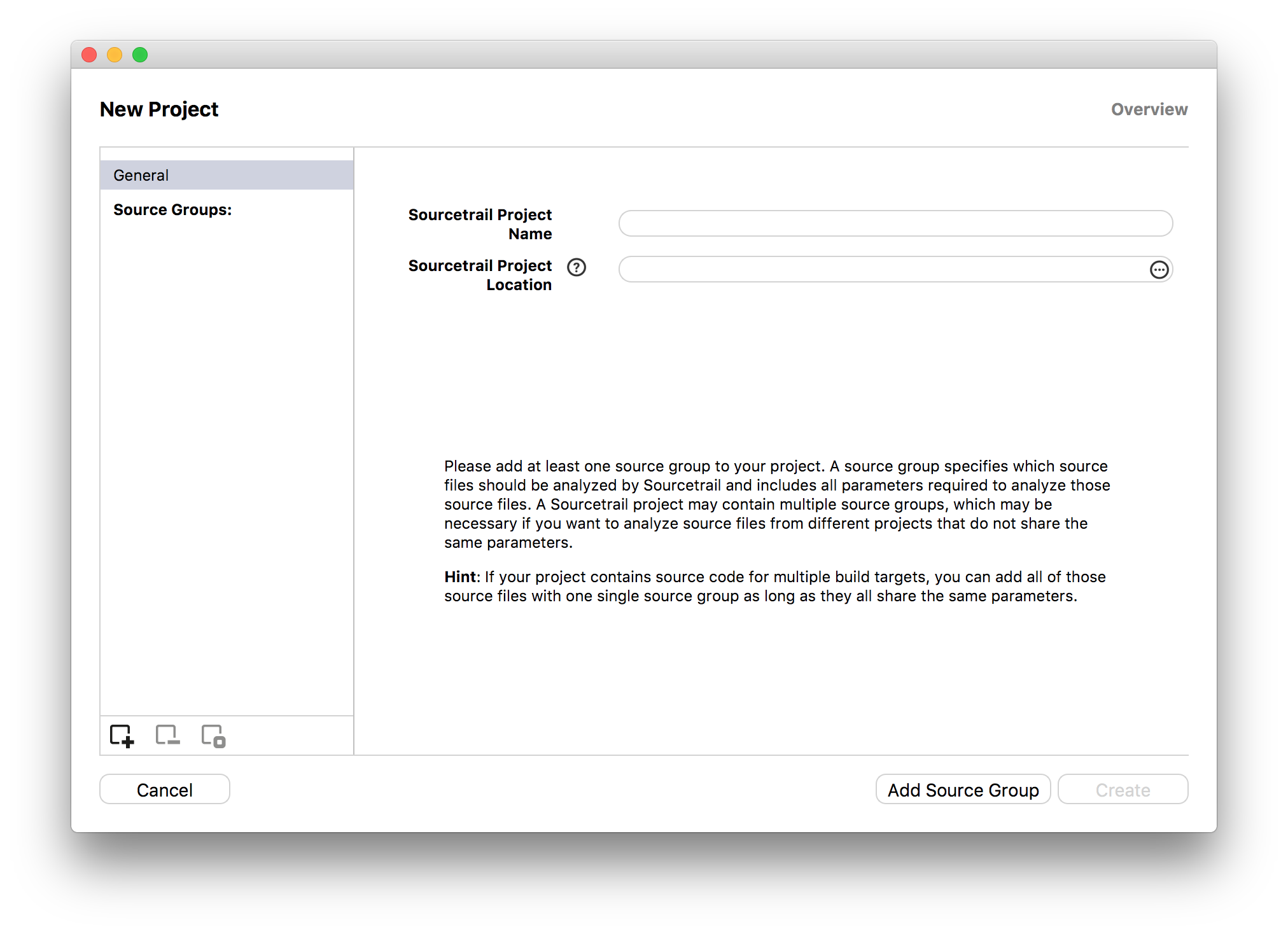
| Setting | Description |
|---|---|
| NumbatUI Project Name | The name of the project. This will also be the name of the .srctrlprj file generated by NumbatUI. |
| NumbatUI Project Location | Choose the location of the project file from the dialog. |
Interactions
- Clicking
Cancelor pressingESCwill close the window and abort the setup process. - Clicking
Add Source Groupwill take you to the creation of a new Source Group. - Clicking
Generalwill take you to the name and location setting of the project. - Clicking a
Source Groupwill let you edit it's configuration and change it's name. - Clicking
+beneath the Source Group list will take you to the creation of a new Source Group. - Clicking
-beneath the Source Group list will delete the currently selected Source Group. - Clicking
☐beneath the Source Group list will duplicate the currently selected Source Group. - Clicking
Createwill close this window and create the new project.
This window is also used when editing the project. You can select a Source Group from the list on the left and edit it's contents then. Additionally you can also set the active flag of certain Source Groups to false, so they won't get indexed when refreshing the project.
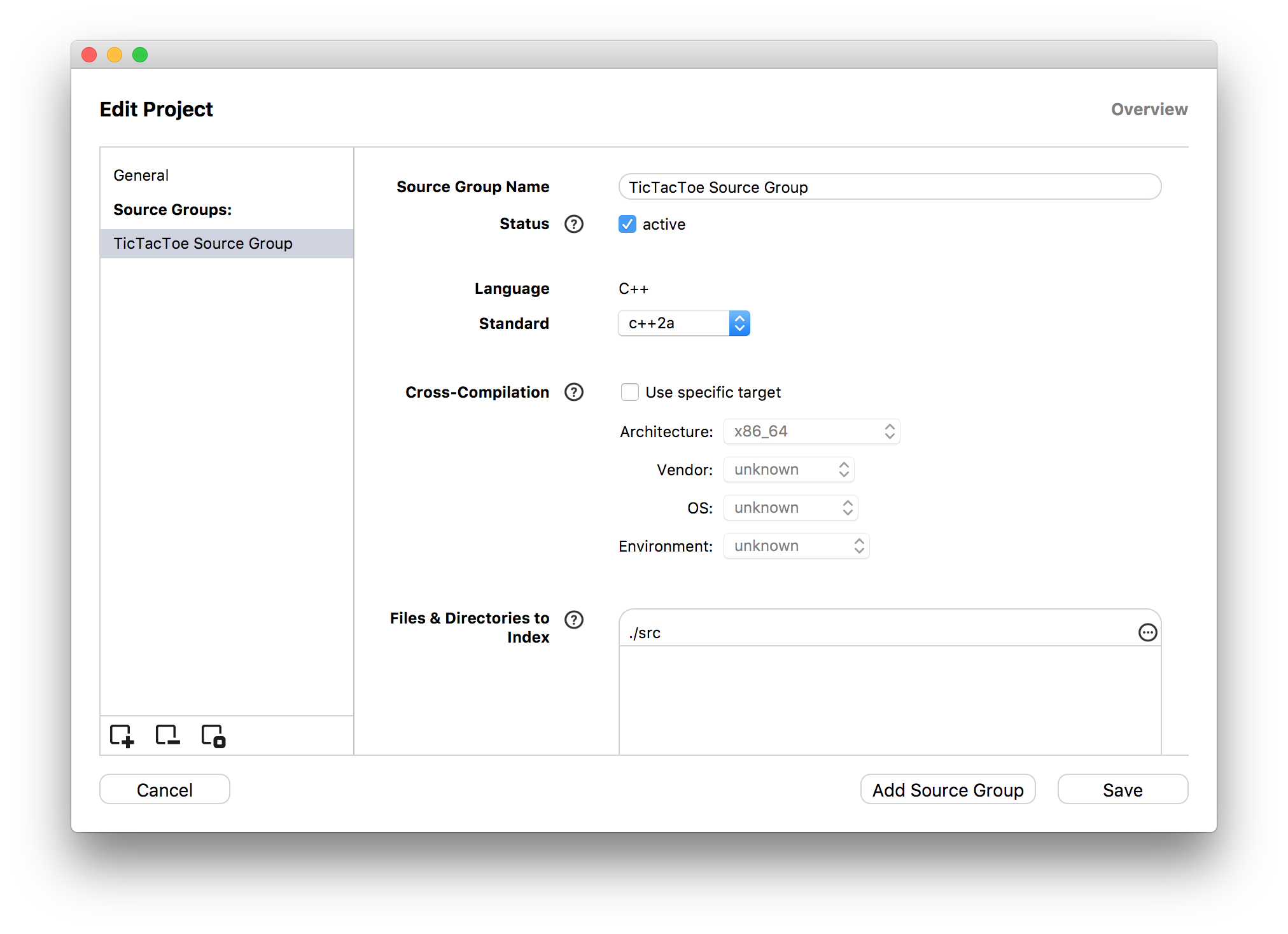
Interactions
- Change the name of the Source Group.
- Activate/Deactivate the Source Group for indexing.
- Change any settings defined during Source Group setup.
Choose a Source Group Type
When creating a new Source Group you can choose between different methods of setup depending on your project language. Please have a look at our QUICK START GUIDE section for help on choosing the right Source Group type.
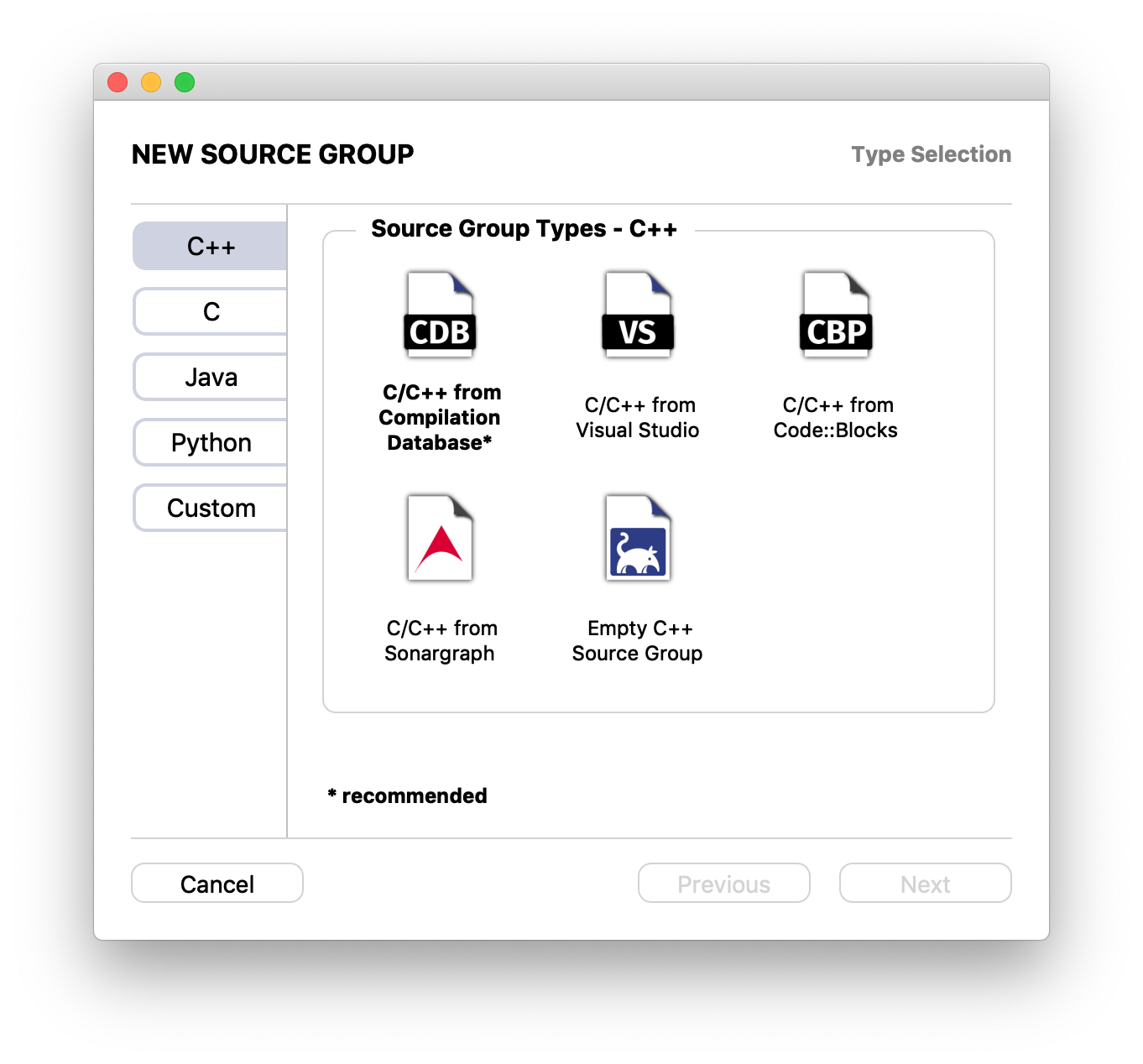
Interactions
- Select the language used in code project.
- Selecting a Source Group type will determine how you enter all the required information.
- Clicking
Cancelor pressingESCwill close the window. - Clicking
Nextwill take you to the next step of the setup process.
Empty C/C++ Source Group
Empty C/C++ Source Groups have the following configuration options:
| Setting | Description |
|---|---|
| Standard | Select the language standard that should be used for indexing your project. Usually the most recent language standard is preselected here. (See Language Support) |
| Cross-compilation | Check Use specific target and then use the dropdown boxes to specify a certain target platform. Please have a look at the clang compiler documentation on cross-compilation for more information. |
| Files & Directories to Index | These paths define the files and directories that will be indexed by NumbatUI. Provide a directory to recursively add all contained source and header files. If your project's source code resides in one location, but generated source files are kept at a different location, you will also need to add that directory. You can make use of environment variables with ${ENV_VAR}.For instructions on how to add paths see Path List Box. |
| Excluded Files & Directories | These paths define the files and directories that will be left out from indexing. Hints:
|
| Source File Extensions | Define the valid extensions for source files including the dot e.g. .cpp. NumbatUI will only try to index files that match one of these extensions. |
| Include Paths | Include Paths are used for resolving #include directives in the indexed source and header files. These paths are usually passed to the compiler with the -I or -iquote flags. Add all paths #include directives throughout your project are relative to. If all #include directives are specified relative to the project's root directory, please add that root directory here. If your project also includes files from external libraries (e.g. boost), please add these directories as well (e.g. add path/to/boost_home/include). You can make use of environment variables with ${ENV_VAR}.For instructions on how to add paths see Path List Box. |
| Global Include Paths | The Global Include Paths will be used in all your projects in addition to the project specific Include Paths. These paths are usually passed to the compiler with the '-isystem' flag. Use them to add system header paths (See Finding System Header Locations or use the auto detection below). For instructions on how to add paths see Path List Box. |
| Framework Search Paths (macOS only) | These paths are used to find .framework files used by your project. (For instructions on how to add paths see Path List Box.) |
| Global Framework Search Paths (macOS only) | These Framework Search Paths will be used in all your projects. ( For instructions on how to add paths see Path List Box. For instructions on how to find the system header paths see Finding System Header Locations) |
| Compiler Flags | Define additional compiler flags used during indexing including the dash (e.g. use -DRELEASE to add a #define for RELEASE).For instructions on how to add paths see Path List Box. |
| Precompiled Header File | Select the path to the header file that should be used to generate a Precompiled Header File. The Precompiled Header File will be generated as pre-indexing step. If no path is supplied, no Precompiled Header File will be generated. |
| Precompiled Header Flags | Define if the already supplied compiler flags should be used for Precompiled Header File generation and define additional flags for Precompiled Header File generation only. For instructions on how to add paths see Path List Box. |
C/C++ Source Group from Compilation Database
If you are using CMake you can export compile commands by defining the CMAKE_EXPORT_COMPILE_COMMANDS flag and then use the exported .json file for NumbatUI project setup.
For non-CMake projects you can use Bear. Bear generates a .json file during the simulated build process. Bear has been tested on FreeBSD, GNU/Linux and OS X.
C/C++ Source Groups from Compilation Database offer the following configuration options:
| Setting | Description |
|---|---|
| Compilation Database | Select the compilation database file for the project. NumbatUI will index your project based on the compile commands this file contains using all include paths and compiler flags of these compile commands. The project will stay up to date with changes in the compilation database on every refresh. You can make use of environment variables with ${ENV_VAR}. |
| Header Files & Directories to Index | Your Compilation Database already specifies which source files are part of your project. But NumbatUI still needs to know which header files to index as part of your project and which to skip. Choosing to skip indexing your system headers or external frameworks will significantly improve the overall indexing performance. Use this list to define which header files should be indexed by NumbatUI. Provide a directory to recursively add all contained files. You can make use of environment variables with ${ENV_VAR}. Hint: Just enter the root path of your project if you want NumbatUI to index all contained headers it encounters. For instructions on how to add paths see Path List Box. |
| Excluded Files & Directories | These paths define the files and directories that will be left out from indexing. Hints:
|
| Additional Include Paths | Include Paths are used for resolving #include directives in the indexed source and header files. These paths are usually passed to the compiler with the '-I' or '-iquote' flags. Add all paths #include directives throughout your project are relative to. If all #include directives are specified relative to the project's root directory, please add that root directory here. If your project also includes files from external libraries (e.g. boost), please add these directories as well (e.g. add 'path/to/boost_home/include'). You can make use of environment variables with ${ENV_VAR}. For instructions on how to add paths see Path List Box. |
| Global Include Paths | The Global Include Paths will be used in all your projects in addition to the project specific Include Paths. These paths are usually passed to the compiler with the '-isystem' flag. Use them to add system header paths (See Finding System Header Locations or use the auto detection below). For instructions on how to add paths see Path List Box. |
| Framework Search Paths (macOS only) | These paths are used to find .framework files used by your project. (For instructions on how to add paths see Path List Box.) |
| Global Framework Search Paths (macOS only) | These Framework Search Paths will be used in all your projects. ( For instructions on how to add paths see Path List Box. For instructions on how to find the system header paths see Finding System Header Locations) |
| Additional Compiler Flags | Define additional compiler flags used during indexing including the dash (e.g. use -DRELEASE to add a #define for RELEASE).For instructions on how to add paths see Path List Box. |
| Precompiled Header File | Select the path to the header file that should be used to generate a Precompiled Header File. The Precompiled Header File will be generated as pre-indexing step. If no path is supplied, no Precompiled Header File will be generated. |
| Precompiled Header Flags | Define if the already supplied compiler flags should be used for Precompiled Header File generation and define additional flags for Precompiled Header File generation only. For instructions on how to add paths see Path List Box. |
C/C++ Source Group from Code::Blocks
If you already have a working Code::Blocks project (.cbp) for your source code you can use it to create a project with NumbatUI. Note that a .cbp file will be generated by the QtCreator if a CMakeLists file is imported.
C/C++ Source Groups from Code::Blocks offer the following configuration options:
| Setting | Description |
|---|---|
| C++ Standard | Select the language standard that should be used for indexing your project's C++ files. Usually the most recent language standard is preselected here. (See Language Support) |
| C Standard | Select the language standard that should be used for indexing your project's C files. Usually the most recent language standard is preselected here. (See Language Support) |
| Code::Blocks Project | Select the .cbp file for the project. NumbatUI will index your project based on the settings specified by the Code::Blocks project file. Your NumbatUI project will stay up to date with changes in the Code::Blocks project file on every refresh. You can make use of environment variables with ${ENV_VAR}. |
| Header Files & Directories to Index | Your Code::Blocks project already specifies which source files are part of your project. But NumbatUI still needs to know which header files to index as part of your project and which to skip. Choosing to skip indexing your system headers or external frameworks will significantly improve the overall indexing performance. Use this list to define which header files should be indexed by NumbatUI. Provide a directory to recursively add all contained files. You can make use of environment variables with ${ENV_VAR}. Hint: Just enter the root path of your project if you want NumbatUI to index all contained headers it encounters. For instructions on how to add paths see Path List Box. |
| Excluded Files & Directories | These paths define the files and directories that will be left out from indexing. Hints:
|
| Source File Extensions | Define the valid extensions for source files including the dot e.g. .cpp. NumbatUI will only try to index files that match one of these extensions. |
| Additional Include Paths | Include Paths are used for resolving #include directives in the indexed source and header files. These paths are usually passed to the compiler with the '-I' or '-iquote' flags. Add all paths #include directives throughout your project are relative to. If all #include directives are specified relative to the project's root directory, please add that root directory here. If your project also includes files from external libraries (e.g. boost), please add these directories as well (e.g. add 'path/to/boost_home/include'). You can make use of environment variables with ${ENV_VAR}. For instructions on how to add paths see Path List Box. |
| Global Include Paths | The Global Include Paths will be used in all your projects in addition to the project specific Include Paths. These paths are usually passed to the compiler with the '-isystem' flag. Use them to add system header paths (See Finding System Header Locations or use the auto detection below). For instructions on how to add paths see Path List Box. |
| Framework Search Paths (macOS only) | These paths are used to find .framework files used by your project. (For instructions on how to add paths see Path List Box.) |
| Global Framework Search Paths (macOS only) | These Framework Search Paths will be used in all your projects. ( For instructions on how to add paths see Path List Box. For instructions on how to find the system header paths see Finding System Header Locations) |
| Additional Compiler Flags | Define additional compiler flags used during indexing including the dash (e.g. use -DRELEASE to add a #define for RELEASE).For instructions on how to add paths see Path List Box. |
Empty Python Source Group
Choose this option if you want to index Python files using NumbatUI. Empty Python Source Groups offer the following configuration options:
| Setting | Description |
|---|---|
| Python Environment | Here you can specify the path to the directory or to the executable of the (virtual) Python environment that should be used to resolve dependencies within the indexed source code. If you would run: $ cd c:\dev\python\envs$ virtualenv py37you would set it to C:\dev\python\envs\py37 or C:\dev\python\envs\py37\Scripts\python.exe.Leave blank to use the default Python environment. You can make use of environment variables with ${ENV_VAR}. |
| Files & Directories to Index | These paths define the files and directories that will be indexed by NumbatUI. Provide a directory to recursively add all contained source and header files. If your project's source code resides in one location, but generated source files are kept at a different location, you will also need to add that directory. You can make use of environment variables with ${ENV_VAR}. For instructions on how to add paths see Path List Box. |
| Excluded Files & Directories | These paths define the files and directories that will be left out from indexing. Hints:
|
| Source File Extensions | Define the valid extensions for source files including the dot e.g. .py. NumbatUI will only try to index files that match one of these extensions. |
Custom Command Source Group
In a Custom Command Source Group you can define a set of files and a command line call used to index each of these files. This Source Group type was introduced to integrate custom indexers written with NumbatUIDB.
Custom Command Source Groups offer the following configuration options:
| Setting | Description |
|---|---|
| Custom Command | The command line call executed for each source file. You can pass different pre-defined parameters:
|
| Run in Parallel | Whether files should be processed in parallel. |
| Files & Directories to Index | These paths define the files and directories that will be indexed by NumbatUI. Provide a directory to recursively add all contained source and header files. If your project's source code resides in one location, but generated source files are kept at a different location, you will also need to add that directory. You can make use of environment variables with ${ENV_VAR}. For instructions on how to add paths see Path List Box. |
| Excluded Files & Directories | These paths define the files and directories that will be left out from indexing. Hints:
|
| Source File Extensions | Define the valid extensions for source files including the dot e.g. .ext. NumbatUI will only try to index files that match one of these extensions. If no extension is defined, any file extension is valid. |